
Customer segments are actionable, rule-based groups of customers you target with a distinct message, offer, or sales motion. Start by naming the decision your segmentation must drive. Then pick one data attribute to test it against. Then run a single targeted mini-campaign to test the segment's validity.
Three immediate actions you can take right now:
- Name the decision first. Will this segment change your email copy, your sales routing, or your ad spend? A segment without a downstream decision is just a list.
- Pick one attribute and test it. Transaction frequency, company size, or last purchase date are all enough to start. Tools like Microsoft Dynamics 365 Customer Insights can suggest segments from a unified profile automatically.
- Run one mini-campaign. Use Shopify's dynamic segmentation or a filtered export from Microsoft Excel to reach 50–200 customers with a single targeted message and measure the response.
Pro Tip: Don't wait until your data is "clean enough." A segment built on 80% complete data and tested in a real campaign teaches you more in two weeks than six months of data prep.
Key Takeaways
Effective customer segmentation starts with naming the decision the segment must drive, then building the simplest rule that separates customers who will respond differently.
| Point | Details |
|---|---|
| Name the decision first | Every segment must change a specific action: messaging, routing, offer, or channel. |
| Start with behavioral rules | Behavioral and RFM segments drive the highest short-term campaign ROI. |
| Minimum 200 records per arm | Segments smaller than 200 records cannot produce statistically reliable A/B test results. |
| Review cadence by type | Behavioral segments need weekly review; firmographic segments need quarterly review. |
| Currexchanger for FX operators | Centralizes transaction logs, KYC flags, and branch analytics to make segments execution-ready. |
Table of Contents
- What customer segments actually are (and why dynamic beats static)
- Seven types of customer segments and when to use each
- How to build customer segments step by step
- Which tools and data sources actually work for segmentation
- How to use segments in marketing and sales campaigns
- How to measure segment performance and refine over time
- GDPR and data protection checklist for Central Europe
- Ready-to-use segment rule templates for B2C and B2B
- Customer segments for currency-exchange operators in Central Europe
- Real-world segmentation case studies worth studying
- Common mistakes that make segmentation fail
- How to choose segmentation depth by company size
- Currexchanger gives FX operators execution-ready segments from day one
- Sources
- FAQ
What customer segments actually are (and why dynamic beats static)
A customer segment is a defined group of people or accounts that share at least one attribute relevant to a business decision. The standard industry term is market segmentation, and the practice sits at the core of every modern marketing and sales operation. The key distinction most teams miss is the difference between dynamic and static segments.
Dynamic segments are rule-driven and auto-updating. Every time a customer's behavior or profile changes, the segment membership updates automatically. Shopify describes this model clearly: dynamic, rule-based lists refresh in real time and are the right tool for ongoing campaigns, personalization flows, and automated email triggers. Example: "All customers who purchased in the last 60 days AND have not opened the last three emails" — this list changes daily without anyone touching it.
Static segments are manual snapshots. You export a list at a point in time, use it for a one-off campaign or a quarterly report, and it does not update. Static lists work well for annual reviews, one-time outreach to a closed cohort, or historical analysis.
- Dynamic segments: best for live campaigns, triggered workflows, personalization, and retention automation
- Static segments: best for one-off outreach, reporting, and research where a fixed cohort matters
The practical takeaway: build dynamic segments in your CRM or CDP for anything you plan to run more than once. Use static exports for everything else.
Seven types of customer segments and when to use each
Academic and applied research on klientų segmentavimas consistently identifies the same core categories. Here is a compact catalog with a one-line use case and a template rule for each.
- Demographic: Age, gender, income, education. Use when your product's value proposition changes by life stage. Template:
age >= 30 AND age <= 45 AND income_band = "mid" - Geographic: Country, city, region, postal code. Use for localized offers, branch routing, or language targeting. Template:
country = "LT" OR country = "PL" - Psychographic: Values, lifestyle, attitudes. Use for brand positioning and content strategy rather than short campaigns. Template:
survey_segment = "sustainability_conscious" - Behavioral: Purchase history, product usage, session frequency. The most actionable type for short campaigns. Template:
purchases_last_90_days >= 2 AND category = "EUR_exchange" - RFM / Value: Recency, Frequency, Monetary value. Use to prioritize retention and VIP programs. Template:
recency_score >= 4 AND frequency_score >= 3 AND monetary_score >= 4 - Loyalty: Loyalty tier, referral count, tenure. Use for reward campaigns and churn prevention. Template:
loyalty_tier = "gold" AND tenure_months >= 12 - Firmographic / Technographic (B2B): Company size, industry, tech stack. Use for account-based marketing and sales routing. Template:
employee_count >= 50 AND industry = "financial_services" AND crm_tool = "Salesforce"
Behavioral and RFM segments drive the highest short-term campaign ROI. Firmographic and psychographic segments are better inputs for product roadmap and positioning decisions.
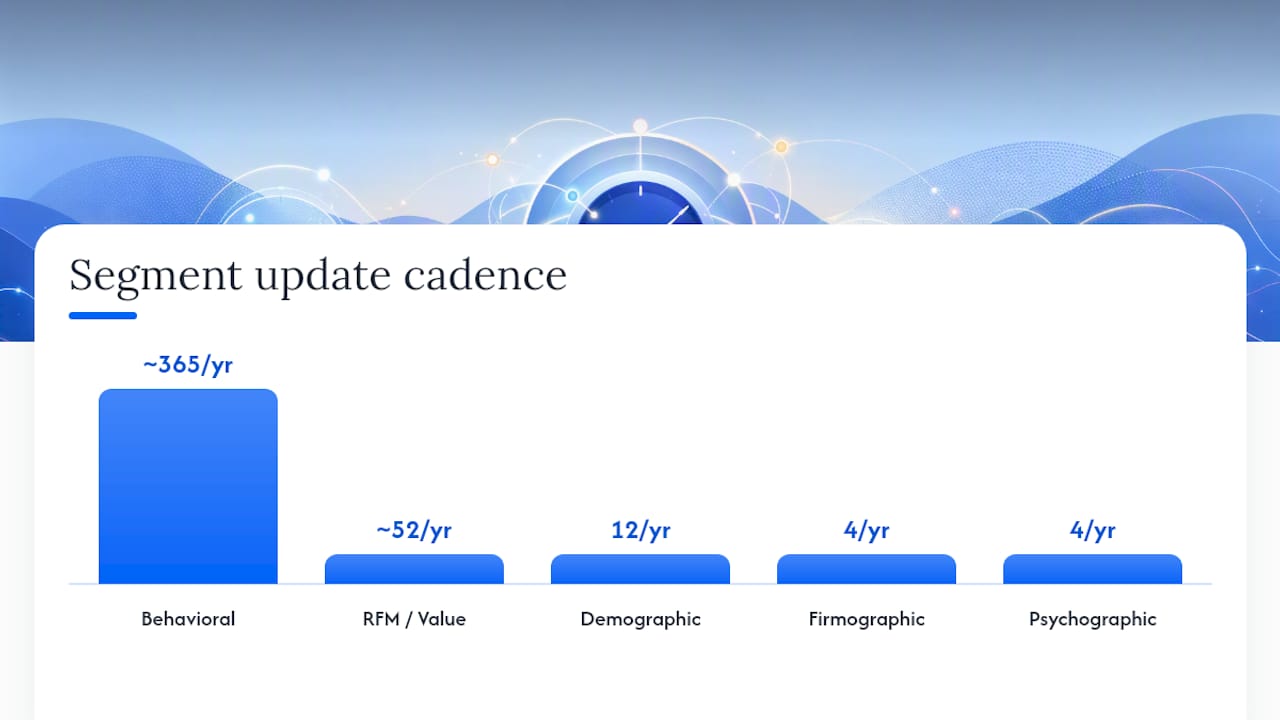
| Segment Type | Best For | Update Cadence |
|---|---|---|
| Behavioral | Short campaigns, triggered flows | Daily / real-time |
| RFM / Value | VIP programs, retention | Weekly |
| Demographic | Broad targeting, media buys | Monthly |
| Firmographic | ABM, sales routing | Quarterly |
| Psychographic | Brand strategy, content | Quarterly |
How to build customer segments step by step
A single iteration from question to validated segment takes roughly two to four weeks for a team with basic CRM access. Here is the minimal process that produces 3–5 testable groups.
- Name the decision. Write one sentence: "This segment will change our [email copy / sales routing / ad budget / pricing offer]." If you cannot finish that sentence, stop and answer it before touching any data.
- Audit your data. List the attributes you need and check whether they exist, how complete they are, and whether they are consistent across sources. Minimum viable data: 200+ records per segment for A/B testing; 1,000+ for machine-learning models.
- Build simple boolean rules first. Start with one or two conditions.
last_purchase_date > today - 90 AND total_spend >= 500. Complexity comes later, after you confirm the segment is real and reachable. - Validate before you launch. Pull a sample of 20–30 records and manually check whether they match your intent. Run a small-sample interview or survey with five customers from the segment. Compare conversion rates against a control group from outside the segment.
- Wire the segment into execution channels. Connect the segment to your email platform, CRM workflow, or ad audience. A segment that lives only in a spreadsheet is not operational.
- Run a pilot campaign. One message, one segment, one metric. Measure open rate, click rate, or conversion rate against a holdout group.
- Review and iterate. After the pilot, ask: did the segment behave differently from the control? If yes, refine the rules and scale. If no, revisit the attribute logic.
Pro Tip: The single most common failure is skipping step 1. Teams build technically correct segments that no one acts on because the downstream decision was never defined. Write the decision on a sticky note and put it next to your screen before you open any data tool.
Which tools and data sources actually work for segmentation
The right tool depends on your data volume and how often you need segments to update. Here is what works in practice, with notes relevant to Central European operators.
| Tool | Best Use | Central Europe Note |
|---|---|---|
| Microsoft Excel | Static segments, one-off analysis, small datasets | Available everywhere; no data-residency concern |
| CRM (e.g., HubSpot, Pipedrive) | Dynamic segments, sales routing, contact scoring | Check EU data hosting option in settings |
| Microsoft Dynamics 365 Customer Insights | Unified profiles, AI-suggested segments, CDP-level automation | EU-hosted; GDPR-compliant by design |
| Shopify Segments | E-commerce behavioral segments, campaign targeting | EU data hosting available; GDPR-ready |
| Google Analytics 4 | Behavioral web segments, audience export to ads | EU data residency setting required |
First-party data sources to prioritize in Central Europe:
- Transaction logs and POS data (most reliable signal for behavioral and RFM segments)
- CRM contact records with company firmographics
- Web behavior from your own analytics platform
- Customer surveys and NPS responses
- Local business registries (e.g., Rekvizitai.lt in Lithuania, CEIDG in Poland) for firmographic enrichment
Third-party data is useful for intent signals and technographic overlays, but EU data-hosting and GDPR compliance must be verified before any third-party data enters your segmentation pipeline. Prefer vendors with EU Standard Contractual Clauses and a signed Data Processing Agreement.
Connecting a segment to execution channels is straightforward once the data is in a CRM or CDP: export as a CSV to your email platform, sync to a Google Ads Customer Match audience, or trigger a CRM workflow directly from the segment rule.
How to use segments in marketing and sales campaigns
Segmentation improves targeting, increases conversion, and helps prioritize resources across every channel. The practical question is which segment to act on first.
Prioritization framework: Score each candidate segment on three dimensions.
- Revenue potential (estimated CLV or average order value of members)
- Intent signal strength (how recently and clearly did they signal buying intent?)
- Ease of activation (do you have their email? Are they reachable on a channel you control?)
Multiply the three scores and act on the highest-scoring segment first. This keeps you from spending activation budget on a theoretically valuable segment you cannot actually reach.
Campaign types mapped to segment types:
- Welcome flow: New customers (first purchase within 30 days). Goal: second purchase. Message angle: product education + social proof. Success metric: 30-day repeat purchase rate.
- Reactivation: Lapsed customers (no purchase in 90–180 days). Goal: re-engage. Message angle: "We noticed you've been away" + a time-limited offer. Success metric: click-to-purchase rate.
- VIP offer: High-RFM customers (top 10% by spend). Goal: increase frequency. Message angle: exclusive access or early product release. Success metric: campaign revenue per recipient.
- Upsell / cross-sell: Customers who bought product A but not product B, where B is a logical complement. Goal: expand wallet share. Message angle: "Customers like you also use..." Success metric: attach rate.
- Churn prevention: Loyalty members whose engagement has dropped two tiers in 60 days. Goal: retain. Message angle: personalized check-in + loyalty reward reminder. Success metric: 90-day retention rate.
For B2B teams, stacking firmographic, behavioral, and intent layers produces the most actionable account-level segments. The recommendation from current B2B practice: 4–7 segments that feed automated routing and personalization justify the investment; more than that and execution capacity becomes the bottleneck.
How to measure segment performance and refine over time
Segments that are never measured drift from reality. Track these KPIs per segment, not just at the aggregate level.
- Conversion rate: The percentage of segment members who complete the target action (purchase, demo booking, form fill)
- Customer lifetime value (CLV): Projected or historical revenue per customer in the segment
- Retention / churn rate: What percentage of segment members are still active after 90 days?
- Average order value (AOV): Useful for RFM and VIP segments to confirm the segment is behaving as expected
- Campaign ROI: Revenue attributed to the campaign divided by campaign cost
Testing plan template:
- Hypothesis: "Customers in the lapsed segment who receive a 10% discount offer will convert at a higher rate than those who receive no offer."
- Test design: 50/50 split, minimum 200 per arm, 14-day window.
- Primary metric: conversion rate. Secondary: AOV.
- Significance threshold: 95% confidence before acting on the result.
- Action: if the hypothesis holds, roll out to the full segment; if not, test a different message angle before changing the segment rules.
Refinement cadence:
| Segment Type | Review Frequency | Trigger to Refine |
|---|---|---|
| Live intent / behavioral | Weekly | Conversion rate drops >20% vs. prior period |
| RFM / value | Monthly | Segment size changes frequently without a campaign |
| Firmographic / demographic | Quarterly | ICP definition changes or new market entered |
Merge two segments when their conversion rates and AOV are statistically indistinguishable. Split a segment when you notice two clearly different response patterns inside it. Retire a segment when it consistently underperforms the control group and no rule adjustment improves it.
GDPR and data protection checklist for Central Europe
Segmenting customers in Central European markets means operating under GDPR. This is not optional, and the checklist below is the minimum you need before a segment goes live.
- Lawful basis: Confirm the legal basis for processing each attribute used in your segment rules (consent, legitimate interest, contract performance). Document it.
- Transparency: Customers must know their data is used for segmentation and targeting. Check your privacy notice.
- Data minimization: Use only the attributes the segment rule actually needs. Do not pull 40 fields when 3 will do.
- Storage limits: Set a retention period for segment data. Inactive records should be purged or anonymized on schedule.
- Purpose limitation: A segment built for email campaigns cannot be repurposed for credit scoring without a new lawful basis.
- Vendor due diligence: Confirm EU data hosting, a signed DPA, a subprocessor list, ISO 27001 or SOC 2 certification, and a breach notification SLA of 72 hours or less.
- Consent source per record: Record where and when consent was collected for each contact. Keep segmentation rules traceable so you can demonstrate compliance to a regulator.
For teams integrating AML/KYC data into segments, financial compliance software integrations add another layer of regulatory obligation. KYC flags used in segmentation must be handled under the same data-minimization and purpose-limitation rules as any other personal data.
Pro Tip: Store the consent source (e.g., "website signup form, March 2025") as a field on every contact record. When a regulator asks how you built a segment, you can answer in minutes instead of days.
Ready-to-use segment rule templates for B2C and B2B
These templates are written in plain boolean logic. Adapt them to your CRM, CDP, or Excel filter syntax.
B2C templates:
- High-value active customer:
total_spend_12m >= 1000 AND last_purchase_date >= today - 60 AND email_opt_in = TRUE - Lapsed mid-value customer:
total_spend_12m BETWEEN 200 AND 999 AND last_purchase_date BETWEEN today - 91 AND today - 180
B2B templates:
- Warm enterprise prospect:
employee_count >= 200 AND industry IN ("financial_services", "retail") AND last_web_visit >= today - 14 AND demo_requested = FALSE - Expansion-ready account:
contract_value >= 5000 AND product_modules_active < 3 AND nps_score >= 8 AND account_age_months >= 6
Minimum segment size guidance:
- For A/B testing: at least 200 records per arm (400 total) to detect a meaningful difference at 95% confidence.
- For machine-learning models: 1,000+ labeled records per segment class as a practical floor.
- For manual outreach or pilot campaigns: 50–200 is enough to learn; below 50, treat results as directional only.
Transforming a business question into rule syntax follows one pattern: identify the observable behavior or attribute that signals the customer state you care about, then express it as a condition a database can evaluate. "Customers who are about to churn" becomes last_login_date < today - 30 AND support_tickets_open >= 2 AND renewal_date <= today + 60.
Practical segmentation guides emphasize that the rule syntax matters less than the clarity of the business question behind it. Get the question right first.
Customer segments for currency-exchange operators in Central Europe
Currency-exchange operators have a specific set of segments that matter operationally, not just for marketing. Here are the most useful ones, grounded in how FX networks actually run.
- Inbound tourists: High transaction frequency during travel seasons, low average ticket, cash-dominant. Segment rule:
transaction_type = "cash_exchange" AND customer_type = "individual" AND visit_count = 1. Track: average ticket size, peak hour distribution, branch location. - Corporate cash clients: Regular bulk exchanges, invoice-driven, relationship-sensitive. Segment rule:
customer_type = "corporate" AND transaction_frequency_monthly >= 4 AND avg_transaction_value >= 2000. Track: transaction frequency, average ticket, account manager assignment. - VIP repeat customers: High monetary value, high recency, low churn risk. Segment rule:
rfm_score >= 12 AND visits_last_90_days >= 3. Track: CLV, retention rate, preferred currency pairs. - Online reservation customers: Pre-booked transactions via digital channel, higher conversion intent. Segment rule:
channel = "online_reservation" AND reservation_status = "confirmed". Track: show-up rate, conversion to completed transaction. - Business partners and referral sources: Accounts that send volume through referral agreements. Segment rule:
partner_flag = TRUE AND referral_transactions_last_90_days >= 1. Track: referred transaction volume, partner retention.
Currexchanger's platform centralizes transaction logs, KYC flags, and branch-level analytics in one place, which means these segment rules can be applied directly to operational data without manual exports. Real-time reporting lets branch managers see segment behavior as it happens rather than reviewing it a week later.
For currency exchange customer retention, the most predictive KPIs per segment are transaction frequency, average ticket, cash balance variance, and KYC flag rate. Monitor these weekly for VIP and corporate segments; monthly for tourist and online reservation segments.
Pro Tip: Wire your VIP segment directly to branch routing. When a flagged VIP customer walks in or submits an online reservation, route them to a senior cashier automatically. The operational lift is small; the retention impact is measurable within 90 days.
Real-world segmentation case studies worth studying
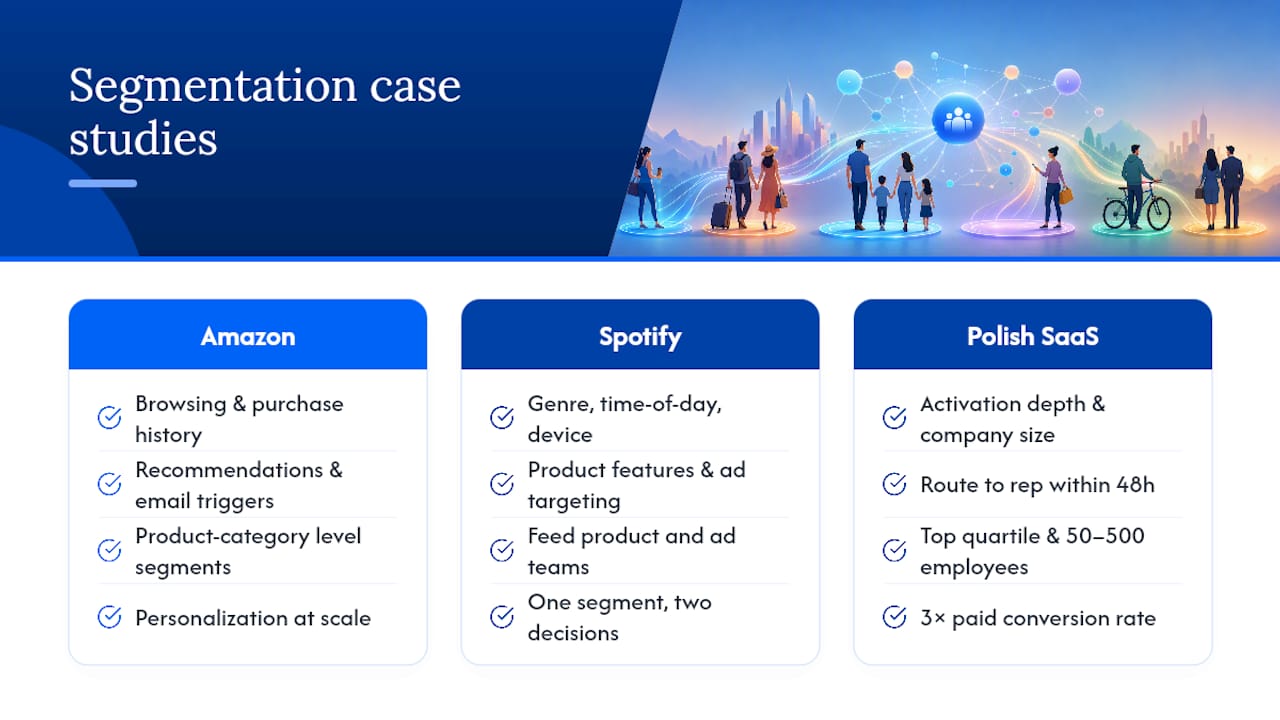
Three cases show how segmentation produces measurable results when the rules are tied to real decisions.
Amazon's behavioral segmentation is the most studied example in e-commerce. The company segments customers by browsing and purchase history at the product-category level, then uses those segments to drive recommendation engines and email triggers. The mechanism is behavioral: what you looked at, what you bought, and what customers with similar profiles bought next. The result is a personalization engine that operates at scale without manual campaign management.
Spotify's listening-behavior segments drive both product features (Discover Weekly, Daily Mixes) and advertising targeting. Spotify segments by genre affinity, listening time of day, and device type. The segments feed both the product team (which features to build) and the ad sales team (which audiences to package for brands). One segment type serving two completely different business decisions.
A Central European B2B SaaS example: A mid-market software company in Poland segmented its trial users by activation depth (how many features used in the first 14 days) and company size. Trials in the top activation quartile from companies with 50–500 employees converted to paid at three times the rate of the rest. The company routed those accounts to a dedicated sales rep within 48 hours of trial signup. That single routing rule, built on two segment attributes, drove a measurable lift in conversion without changing the product or the pricing.
Regional GTM work consistently shows that cultural buying norms change which segments respond best to which channels. In Central Europe, relationship-first channels (direct sales, partner referrals) outperform cold digital outreach for high-value B2B segments. Segment your channel strategy, not just your messaging.
Common mistakes that make segmentation fail
Most segmentation failures are not data problems. They are decision problems.
Segments without a downstream action. A segment that no one acts on is a reporting artifact. Before building any segment, confirm which team will use it, in which tool, and on which date.
Too many segments, too little execution capacity. B2B segmentation practice recommends 4–7 actionable segments. Teams that build 20 segments typically execute on three of them. The rest decay.
Using demographic proxies instead of behavioral signals. "Women aged 25–34" is a demographic segment. "Women aged 25–34 who purchased twice in the last 60 days and opened the last two emails" is a behavioral segment. The second one converts at a meaningfully higher rate because it captures intent, not just identity.
Ignoring minimum sample size. A segment of 30 people cannot tell you whether your campaign worked. Results from small segments are directional at best. Set a minimum size threshold before treating any result as a signal.
Letting segments go stale. A firmographic segment built on last year's company data is wrong for a meaningful share of accounts. Set a review cadence and stick to it.
Skipping validation. Pulling 20 records manually and checking whether they match your intent takes 30 minutes. Skipping it and launching to 10,000 customers with the wrong message costs far more. Practical segmentation guides flag this as one of the most common and most avoidable errors.
Treating segmentation as a one-time project. Segments drift as customer behavior changes. The teams that get the most value from segmentation treat it as an ongoing operational practice, not a quarterly deliverable.
How to choose segmentation depth by company size
The honest answer is that most teams over-engineer their segmentation relative to their execution capacity.
For small operators (under 10 people, single location): start with two or three behavioral segments in Excel or your CRM's built-in filter. One for active customers, one for lapsed, one for high-value. Run one campaign per segment per quarter. That is enough to see a measurable difference in retention without building infrastructure you cannot maintain.
For mid-market teams (10–100 people, multiple locations or channels): a CRM with dynamic segment rules is the right tool. Add RFM scoring once you have 12 months of transaction data. Consider a CDP like Microsoft Dynamics 365 Customer Insights when you need to unify data from more than two sources and your segments need to update daily. European SaaS market-entry guidance consistently shows that country-clustered ICPs and localized pricing rules matter more than segment granularity at this stage.
For enterprise operators (100+ people, multi-country, multiple product lines): invest in a CDP and layer intent signals on top of firmographic fit. Without automation, segmentation at this scale loses ROI faster than it creates it. The DACH GTM playbook is a useful parallel for Central European operators: map engagement models explicitly to each segment, because the channel that works for one segment often fails for another.
The trade-off no one talks about: more granular segments require more content variants, more campaign setups, and more measurement overhead. A team that can execute three campaigns well beats a team that plans twelve and delivers four poorly. Match your segmentation depth to your execution capacity, not to what the software can theoretically produce.
Currexchanger gives FX operators execution-ready segments from day one
Currency-exchange networks sit on some of the richest transactional data in financial services: every exchange, every customer, every branch, every KYC check. The problem is that data usually lives in disconnected systems, which means segments stay theoretical.
Currexchanger centralizes transaction logs, KYC flags, multi-branch analytics, and real-time reporting in one platform. That means VIP routing, corporate client tracking, and online reservation segmentation are operational from the moment the data is connected, not after a six-month integration project. For FX operators who need personalized financial strategies for their corporate clients, the data is already there. You just need a system that surfaces it. Book a demo at Currexchanger to see how segment-driven routing and analytics work in a live FX environment.
Sources
- B2B customer segmentation 2026: intent + account fit
- Shopify — Customer segmentation (help center)
- Siūlomi segmentai (peržiūra) - „Customer Insights“
- Klientų segmentacija | LiveAgent - Help Desk Programinė Įranga ir Live Chat
- How Barie Builds a Go-To-Market Strategy for Launching a B2B SaaS Product in Europe
- RoleCatcher | Įvaldykite klientų segmentavimo įgūdžius: išsamus veiksmingų taikymo strategijų vadovas
FAQ
What are customer segments in marketing?
Customer segments are rule-based groups of customers who share at least one attribute relevant to a business decision, such as purchase behavior, company size, or geographic location. The goal is to reach each group with a distinct message or offer that fits their specific situation.
How many customer segments should a business have?
B2B segmentation practice recommends 4–7 actionable segments as the practical range. Fewer than four often means you are missing meaningful differences between groups; more than seven usually exceeds a team's execution capacity.
What is the difference between dynamic and static segments?
Dynamic segments update automatically when customer data changes, making them ideal for ongoing campaigns and personalization. Static segments are manual snapshots used for one-off outreach or historical reporting.
Which tool is best for building customer segments?
The right tool depends on your data volume: Microsoft Excel works for small static segments, a CRM handles dynamic rule-based segments for most mid-market teams, and a CDP like Microsoft Dynamics 365 Customer Insights is appropriate when you need unified profiles and automated segment suggestions across multiple data sources.
How does Currexchanger support customer segmentation for FX operators?
Currexchanger centralizes transaction logs, KYC flags, and multi-branch analytics in one platform, letting FX operators define and activate operational segments, such as VIP repeat customers or corporate cash clients, without manual data exports.