
User access management is the set of processes and tools that decide who can log in to a system, what they can see once they're in, and when that access gets taken away. It covers three core actions: granting access, modifying it as someone's role changes, and revoking it the moment it's no longer needed.
The stakes are higher than most people assume. Stale accounts and excessive permissions are two of the most common paths attackers use to get into a network, because a former employee's still-active login or a manager's forgotten admin rights don't set off alarms the way a stranger's password guess does.
Three ideas anchor everything else in this article:
- The Joiner–Mover–Leaver (JML) lifecycle, which governs how access changes as people move through an organization
- The principle of least privilege, which limits what anyone can touch to only what their job requires
- Automation, which is what turns these principles from policy documents into something that actually happens
Key Takeaways
User access management works when least privilege, JML automation, and periodic reviews run together as one continuous process rather than three separate initiatives.
| Point | Details |
|---|---|
| Definition matters | UAM governs granting, modifying, and revoking access, plus authentication and authorization for every identity, human or not. |
| Automate the JML lifecycle | Link provisioning and deprovisioning to HR system events so access changes the same day employment status does. |
| Default to least privilege | Audit permissions regularly and strip anything unused, following practices like those Microsoft outlines. |
| Review access on a schedule | Run periodic certification, more frequently for privileged accounts, so managers actively confirm access is still needed. |
| Fix scale, not just policy | Standardize role definitions and automate discovery to eliminate orphaned accounts and shadow IT. |
Table of Contents
- What Are the Key Components of User Access Management?
- How Does the Joiner-Mover-Leaver Lifecycle Work?
- How Does User Access Actually Work Under the Hood?
- What Are the Best Practices for Managing User Access?
- Why Do User Access Programs Break Down at Scale?
- What Do ISO, EBA, and NIST Say About Access Management?
- How Do Currency Exchange Platforms Handle User Access?
- Where Access Management Fits Into Your Broader Compliance Stack
- What the Standards Get Right, and What They Leave Out
- Sources
- FAQ
What Are the Key Components of User Access Management?
User access control isn't a single tool. It's a set of interlocking mechanics, and most breaches trace back to a weak link in one of them rather than a total system failure.
- Provisioning. Granting access, usually tied to a role and an approval step. A new hire in the finance department gets a role-based profile that bundles the permissions their job needs, rather than someone hand-picking dozens of individual rights.
- Modification. Access changes for movers, department transfers, project assignments, or temporary elevated access for a specific task, which should always come with an expiration date.
- Deprovisioning. Revoking access on a fixed schedule or the moment someone leaves. This is where most organizations get sloppy, and it's the step attackers count on.
- Authentication, authorization, and entitlements. These three get conflated constantly, but they're distinct.
- Authentication confirms identity: are you who you say you are?
- Authorization determines what an authenticated identity is allowed to do.
- Entitlements are the specific permissions attached to a role or account, the actual line items of what's allowed.
One piece people overlook: non-human identities. Service accounts, API keys, and automated bots need the same lifecycle discipline as a human employee. An orphaned API key with broad permissions is arguably more dangerous than a dormant employee login, because nobody's watching it.
How Does the Joiner-Mover-Leaver Lifecycle Work?
The JML model is the backbone most access management solutions are built around, and it maps directly to how people actually move through a company.
- Joiner. A new employee, contractor, or partner needs access. The check here is provisioning against a predefined role, not building permissions from scratch.
- Mover. Someone changes teams, gets promoted, or takes on a temporary project. The check is making sure old access gets removed, not just new access added, which is how permission creep starts.
- Leaver. Someone exits the organization, voluntarily or not. The check is full deprovisioning, and that means more than deactivating a login. Practitioners in finance environments treat offboarding as a complete sequence: revoke system access, reassign owned data, collect devices, and confirm backups exist before the account is closed.
Automating these triggers changes the math. Linking provisioning and deprovisioning directly to HR system events, using SCIM provisioning standards or single sign-on integrations, means access changes the same day someone's employment status changes, not whenever a ticket gets picked up.
The common failure mode is a manual ticket queue where deprovisioning sits for days or weeks. The fix is connecting your identity provider directly to your HR system so a termination event fires an automatic revocation.

Pro Tip: Run regular audits specifically for orphaned accounts, logins tied to people who no longer work at the company. If you find multiple such accounts, your Leaver process needs automation, not more policy documents.
How Does User Access Actually Work Under the Hood?
Underneath the policy language, access management runs on a few concrete technical building blocks that show up in almost every serious platform.
Authentication methods verify identity before anything else happens. Passwords alone are weak; multi-factor authentication, which pairs a password with a phone prompt, hardware key, or biometric check, blocks the vast majority of credential-based attacks. If a platform doesn't offer MFA as a default, that's a red flag, not a minor gap.
Authorization models decide what an authenticated user can actually do:
- Role-Based Access Control (RBAC) assigns permissions based on job function, a teller role gets different rights than a branch manager role.
- Attribute-Based Access Control (ABAC) goes further, factoring in context like location, device, or time of day before granting access.
- Just-in-time (JIT) elevation grants temporary elevated rights for a specific task, then automatically revokes them.
NIST defines access management as the combination of policy administration, authentication, and authorization, which is a useful way to separate the rulebook (policy) from the mechanics (auth) when you're evaluating a system.
Entitlements, groups, and scopes are how those models get implemented practically. A group might bundle ten entitlements together so an admin assigns one group instead of ten individual permissions.
Finally, every serious system logs everything. Detailed activity logs turn access decisions into an audit trail, showing not just who has access but who used it, when, and to do what.
What Are the Best Practices for Managing User Access?
Most of what separates a well-run access program from a risky one comes down to four habits, applied consistently rather than occasionally.
- Apply least privilege by default. Start every role with the minimum permissions needed and add from there, never the reverse. Microsoft's guidance on least-privileged access recommends auditing permissions regularly and removing anything unused, since unused access is pure risk with no operational upside.
- Define role templates before you need them. Pre-building "birthright" access profiles, the baseline permissions every new hire in a given role automatically receives, prevents the chaos of ad hoc, ticket-by-ticket provisioning. It also stops privilege creep before it starts, because nobody's improvising access decisions under time pressure.
- Run periodic access certification. Managers should review and re-approve their team's access on a set schedule, quarterly for standard roles, more often for privileged ones. This catches the access nobody remembers granting.
- Tighten controls on privileged accounts specifically. Admin-level and financial-system access deserves its own layer of scrutiny: just-in-time elevation, privileged access management (PAM) tooling, and mandatory multi-factor authentication with no exceptions.
Pro Tip: Don't treat access reviews as a compliance checkbox. Ask each manager one direct question: "Does this person still need this, today?" A generic "looks fine" approval defeats the entire purpose of the review.
None of this works as a one-time project. Access needs shift constantly as people change roles, take on projects, and eventually leave, which is exactly why the JML lifecycle and periodic reviews have to run continuously rather than as an annual fire drill.
Why Do User Access Programs Break Down at Scale?
The uncomfortable truth about most failed access programs is that the policy was fine. The problem was scale and consistency, not the rulebook itself. Practitioner research on lifecycle management points to this repeatedly: organizations that automate lifecycle events succeed, and organizations that rely on manual processes fall behind as headcount grows.
- Inconsistent role definitions. If three different managers define "sales associate" access differently, you don't have a role, you have three roles wearing one name.
- Shadow IT and orphaned accounts. Tools adopted outside official IT channels create access nobody's tracking, and departed employees' accounts linger because no automated trigger caught the exit.
- No discovery process. You can't fix access you don't know exists. Regular discovery scans across connected systems surface the shadow accounts standard audits miss.
The fix isn't more policy. It's standardizing role definitions across the organization and prioritizing remediation on privileged accounts and critical systems first, as these areas represent the highest risk of oversight.
What Do ISO, EBA, and NIST Say About Access Management?
You don't need to read the full text of every standard to use them well, but knowing the shape of what they require makes audits far less painful.
- EBA and ISO access-control standards require formal user registration and de-registration procedures, along with documented approval workflows for privileged role requests. System owners and managers carry explicit responsibility for identification, authentication, approval, and eventual deletion of access.
- NIST frames access management as three connected services: policy administration, authentication, and authorization, giving auditors a clean structure to test your controls against.
- Using standards as audit evidence means quoting the relevant clause directly in your internal policy documents rather than paraphrasing loosely. Auditors respond better to language that mirrors the standard than to a company's informal summary of it.
Treat these standards as a checklist for your compliance risk assessment process, not paperwork to survive once a year.
How Do Currency Exchange Platforms Handle User Access?
Currexchanger builds user access management directly into how a multi-branch currency exchange operation runs day to day, because in this industry, an access mistake often means a compliance failure, not just an inconvenience.
- Multi-factor authentication on every login, closing the single biggest gap in weak access programs.
- Branch and office-level role assignment, so a teller at one branch can't see transaction data from another office unless that access is explicitly granted.
- Detailed activity logs that record who touched what transaction and when, turning every action into audit-ready evidence.
- IP and geographic restrictions, which block login attempts from unexpected locations before they become a problem.
Automating JML events, new hires, role changes, exits, against pre-built permission templates cuts the manual work compliance teams spend chasing during audits. For a deeper look at how these pieces connect to daily transaction workflows, see how transaction management systems integrate with identity and access controls.
Pro Tip: If your current system can't show you, in under a minute, exactly who accessed a specific transaction and from where, that's a UAM gap worth fixing before your next audit.
Where Access Management Fits Into Your Broader Compliance Stack
None of the components above work in isolation. Access management is most effective when it's wired into your identity provider, your HR system, and your compliance reporting rather than run as a standalone spreadsheet exercise. That integration is what separates a policy that looks good on paper from one that actually holds up when a regulator asks to see it in action.
If you're running currency exchange or financial operations across multiple offices, Currexchanger builds these controls (MFA, branch-level role assignment, activity logging, and IP restrictions) directly into the platform rather than treating them as a bolt-on. For a look at how access controls tie into operational tracking across branches, the guide on tracking liquidity across currencies shows how permission structures support day-to-day monitoring.
What the Standards Get Right, and What They Leave Out
The conventional advice on access management, written from a compliance-first angle, treats JML automation and least privilege as boxes to check for an auditor. That framing undersells the actual payoff. Automation isn't primarily about passing an audit. It's about removing the human delay that turns a routine offboarding into a security gap.
Where standards documents fall short is specificity. EBA and ISO tell you that de-registration procedures must exist. They don't tell you that a ticket sitting in a queue for eleven days is functionally the same as having no procedure at all. That gap between documented policy and operational reality is where most real breaches happen, not in some sophisticated exploit.
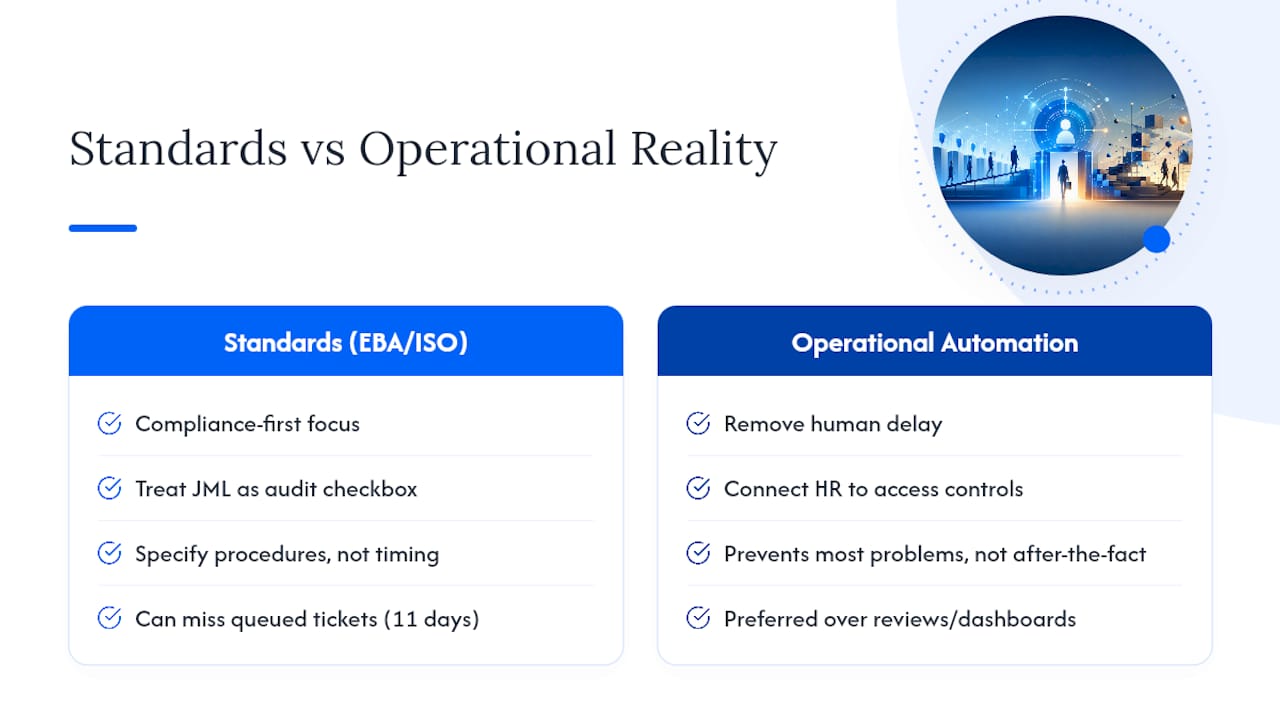
If there's one thing to prioritize above everything else in this article, it's connecting your HR system to your access controls before you spend another dollar on review cycles or dashboards. Reviews catch problems after the fact. Automation prevents most of them from occurring at all.
Sources
- Standard on access control and authentication (EBA annex)
- Secure least-privileged access — Microsoft Learn
FAQ
What Is User Access Management, and How Does It Work?
User access management is the process of granting, modifying, and revoking system access based on identity and role, working through authentication (verifying who someone is) and authorization (determining what they can do).
What Is IAM, and What Is Its Purpose?
Identity and Access Management (IAM) is the broader framework that includes user access management, covering identity verification, authentication, authorization, and lifecycle governance across an organization's systems.
Is CyberArk PAM or IAM?
CyberArk is primarily a Privileged Access Management (PAM) tool, focused specifically on securing and monitoring elevated accounts, though it operates within the broader identity and access management landscape.
What Are Examples of User Access Management Tools?
Examples include identity providers with single sign-on capabilities, SCIM-based provisioning tools that automate account creation and removal, and platforms like Currexchanger that build role-based access, MFA, and activity logging directly into their systems.
Why Does the Principle of Least Privilege Matter?
Least privilege limits each account to only the access it needs, which shrinks the damage a compromised account or insider mistake can cause, and Microsoft's guidance recommends auditing permissions regularly to remove anything unused.